RELP Listener#
The RELP Listener service receives messages over the
relp protocol. In practice, it is an input
service for reliable event delivery and accepts messages from senders that
support RELP.
Other than using a different application protocol over TCP, the
RELP Listener service is functionally equivalent to the
Syslog server service. It automatically listens on all available IP
addresses, including IPv4 and IPv6. This is due to the librelp implementation
method.
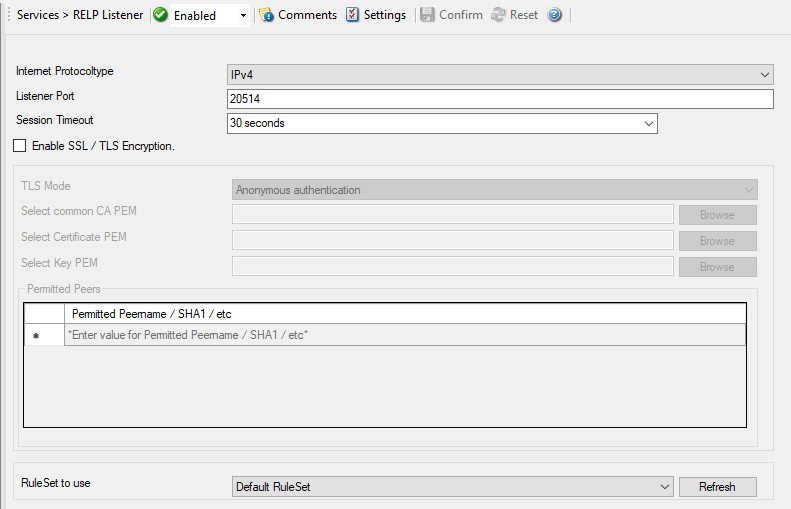
Service - RELP Listener*
Internet Protocoltype#
- File Configuration field:
nInetType
- Description:
Select the desired protocol type. IPv4 and IPv6 are available. The IPv6 protocol needs to be properly installed in order to be used. Note that one Service can only handle IPv4 or IPv6, so if you want to use both protocols, you will need to create two separate services.
Listener Port#
- File Configuration field:
nListenPort
- Description:
The port the
RELP Listenerservice listens on. The typical (standard) value is 20514. This should be changed only if there is a definite need for it. Such a need typically arises from security concerns. If the port is changed, all reporting devices must also be configured to use the non-standard port.
Session Timeout#
- File Configuration field:
nTimeOutSession
- Description:
It controls how long a session is to be opened from the server side.
Enable SSL / TLS Encryption#
- File Configuration field:
nUseSSL
- Description:
This option enables SSL / TLS encryption for the
RELP Listenerservice. Please note that with this option enabled, the service only accepts SSL / TLS enabled senders.
TLS Mode#
- File Configuration field:
nTLSMode
- Description:
The TLS mode can be set to the following:
Anonymous authentication Default option, which means any client certificate will be accepted, or even none.
x509/name (certificate validation and name authentication) When this mode is selected, the subject within the client certificate will be checked against the permitted peers list. This means the
RELP Listenerservice will only accept the secured connection if it finds the permitted peer in the subject.509/fingerprint (certificate fingerprint authentication) This mode creates a SHA1 Fingerprint from the client certificate it receives, and compares it to fingerprints from the permitted peers list. You can use the debuglog to see fingerprints of client certificates which were not permitted.
Select common CA PEM#
- File Configuration field:
szTLSCAFile
- Description:
Select the CA certificate or CA bundle used to validate certificates presented by connecting clients. If you use a CA chain, include the intermediate CA certificates first and the root CA certificate last.
Select Certificate PEM#
- File Configuration field:
szTLSCertFile
- Description:
Select the server certificate in PEM format. This is the certificate the
RELP Listenerservice presents to connecting clients. If needed, append the intermediate CA certificates after the server certificate so clients can validate the chain.
Select Key PEM#
- File Configuration field:
szTLSKeyFile
- Description:
Select the private key in PEM format that matches the server certificate. Passphrase-protected private keys are not supported.
Permitted Peers#
Permitted Peername / SHA1 / etc#
- File Configuration field:
szIP_[n]
- Description:
This list contains all permitted peers. If x509/name is used, this can contain parts of the client certificate subject. For example if you have CN = secure.syslog.msg in the certificate subject, you can add “secure.syslog.msg” as permitted peer. When using x509/fingerprint, this list holds a list of permitted SHA1 fingerprints. The fingerprints can either be generated with OpenSSL Tools, or grabbed from the debug logfile. The format is like described in RFC 5425, for example:
SHA1:2C:CA:F9:19:B8:F5:6C:37:BF:30:59:64:D5:9A:8A:B2:79:9D:77:A0.
RuleSet to Use#
- File Configuration field:
szRuleSetName
- Description:
Name of the ruleset to be used for this service. The RuleSet name must be a valid RuleSet.