Message Ringbuffer Action#
The Message Ringbuffer action keeps recent copies of processed messages in a named, in-memory buffer. Use it for bounded troubleshooting or an approved integration that needs recent messages. It does not replace archival logging, audit retention, or a disk-backed queue.
The action is available starting with 26.08 in WinSyslog, WinSyslog, EventReporter, and rsyslog Windows Agent builds when the installed edition includes it.
Messages are retained only while the service and this action configuration remain active. When the buffer is full, the oldest retained messages are overwritten. Its contents are lost when the service restarts, when a configuration reload recreates the action, or when the action is removed.
Remote reads use the secure metrics HTTP listener. Enable that listener
through the file-based general(name="Metrics") settings; see
How do I enable the Metrics HTTP listener for Message Ringbuffer access?. Current configuration clients preserve the
Metrics block but do not provide a Metrics editor.
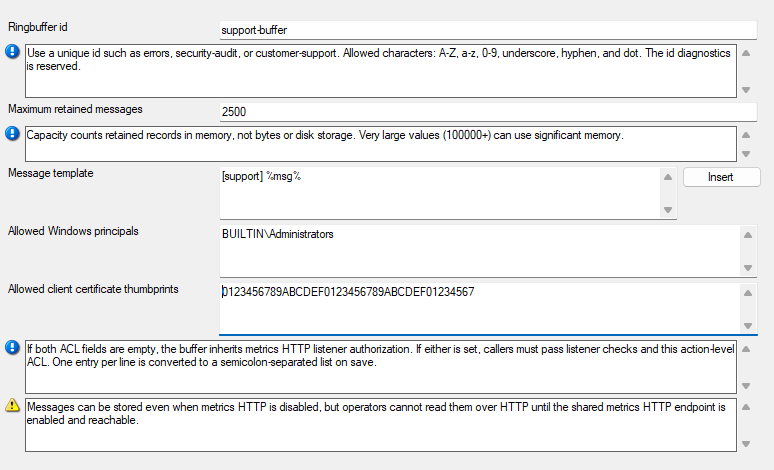
Message Ringbuffer action properties.
Ringbuffer ID#
- File Configuration field:
szRingBufferId
- Description:
Enter a unique ID for this buffer. Use one to 64 letters, digits, periods, underscores, or hyphens. The ID identifies the configured buffer, so do not reuse it for another Message Ringbuffer action. The ID
diagnosticsis reserved and cannot be used.
Maximum retained messages#
- File Configuration field:
nRingBufferMaxMessages
- Description:
Set the number of messages to retain, from 2 through 1,000,000. This is a record count, not a storage size. Choose a bounded value after considering the average message size and the available memory. Larger buffers keep more history but use more memory.
Message template#
- File Configuration field:
szMessageTemplate
- Description:
Define the text stored for each message. The default is
%msg%. Use the property insertion control to include the event properties needed by the intended troubleshooting or integration workflow.
Allowed Windows principals#
- File Configuration field:
szRingBufferAllowedWindowsPrincipals
- Description:
Optionally list the Windows users, groups, aliases, or SID strings that may read this buffer. Separate entries with commas, semicolons, or line breaks. Listener authorization is inherited only when both action ACL fields are empty. If either this field or Allowed client certificate thumbprints is populated, the caller must still pass the metrics HTTP listener checks and must also match at least one populated action ACL list.
Allowed client certificate thumbprints#
- File Configuration field:
szRingBufferAllowedClientCertificateThumbprints
- Description:
Optionally list SHA-1 client certificate thumbprints that may read this buffer. Do not enter SHA-256 fingerprints; this field matches SHA-1 only. Use this only when the deployment requires client-certificate authentication on the configured secure metrics listener. Listener authorization is inherited only when both action ACL fields are empty. If either this field or Allowed Windows users, groups, aliases, or SID strings is populated, the caller must still pass the metrics HTTP listener checks and must also match at least one populated action ACL list.